
Contact
Full Root Access
7-Day Money-Back Guarantee
11 Global Datacenter Locations
Bitcoin, USDT & ETH Accepted
Quick answer: unmanaged VPS hosting gives you full root access to a virtual server and makes you responsible for its ongoing administration — installing software, applying security updates, configuring firewalls and taking backups. In exchange, it costs noticeably less than managed hosting. It's the right choice if you (or your team) are comfortable with basic Linux/Windows server administration, or want a platform without a provider-imposed control panel restricting what you can install.

What Unmanaged VPS Actually Means

Unmanaged means you are the administrator of your server: you decide which software to install, when to apply updates, and how to configure security. VPS For Life does not access the contents of your server except to investigate a confirmed Acceptable Use Policy violation or a valid legal request, both described in our Terms of Service.

This is the opposite of managed hosting, where the provider's team handles OS patching, application updates, monitoring and (sometimes) security hardening on your behalf — usually for a meaningfully higher monthly price. Unmanaged hosting strips that layer of service out, which is exactly why it costs less: you're paying for the virtual machine, the network, and the dedicated resources, not for a team of sysadmins babysitting it.

In practice, "unmanaged" on VPS For Life means: full root access on Linux (Ubuntu, Debian, AlmaLinux, Rocky Linux) or full administrator access on Windows Server, a clean OS template with nothing pre-installed to fight against, and a support team that will help you get deployed and answer configuration questions — without taking over day-to-day administration of your box.

Managed vs Unmanaged VPS: Full Comparison

The single biggest decision when buying a VPS isn't the CPU count — it's whether you want the provider or yourself handling day-to-day administration. Here's the full breakdown.

FactorUnmanaged VPSManaged VPS
Monthly costLower — no admin labor priced inHigher — includes provider staff time
Who installs softwareYou, with full root accessProvider, often from an approved list
OS & security patchingYour responsibilityHandled by the provider (usually)
Control panelOptional — install one yourself if you want itOften pre-installed and sometimes mandatory
Custom software (Docker, Postal, PowerMTA, etc.)Fully supportedOften restricted or unsupported
BackupsYour responsibility unless the plan says otherwiseFrequently included
Response if server misconfigured by youYou fix it, or pay for one-off supportProvider typically fixes it as part of the plan
Best forDevelopers, sysadmins, agencies, self-hosted softwareNon-technical users, businesses without in-house IT
Learning curveRequires basic Linux/Windows admin knowledgeMinimal — provider handles the technical layer

Unmanaged VPS vs VDS vs Dedicated Server

Unmanaged VPS often gets compared against VDS and dedicated servers too — here's how the resource model differs, independent of the managed/unmanaged question.

FactorUnmanaged VPSVDSDedicated Server
What you getIsolated virtual machine, shared physical hostSame virtualization model, often guaranteed resourcesAn entire physical server
Typical starting costFrom $4.95/monthSimilar to VPS pricingSubstantially higher
Root/admin accessFullFullFull
Resource isolationDedicated vCPU/RAM allocation via KVMSame, sometimes marketed as "guaranteed"Entire machine, no virtualization layer
ScalingUpgrade plan tier in minutesUpgrade plan tier in minutesUsually requires a hardware change
Good fit forMost websites, apps, mail servers, dev environmentsSame as VPS — see our VPS vs VDS page for the naming nuanceExtremely heavy, sustained workloads or compliance-driven physical isolation — see VPS vs Dedicated Server

Who's Responsible for What

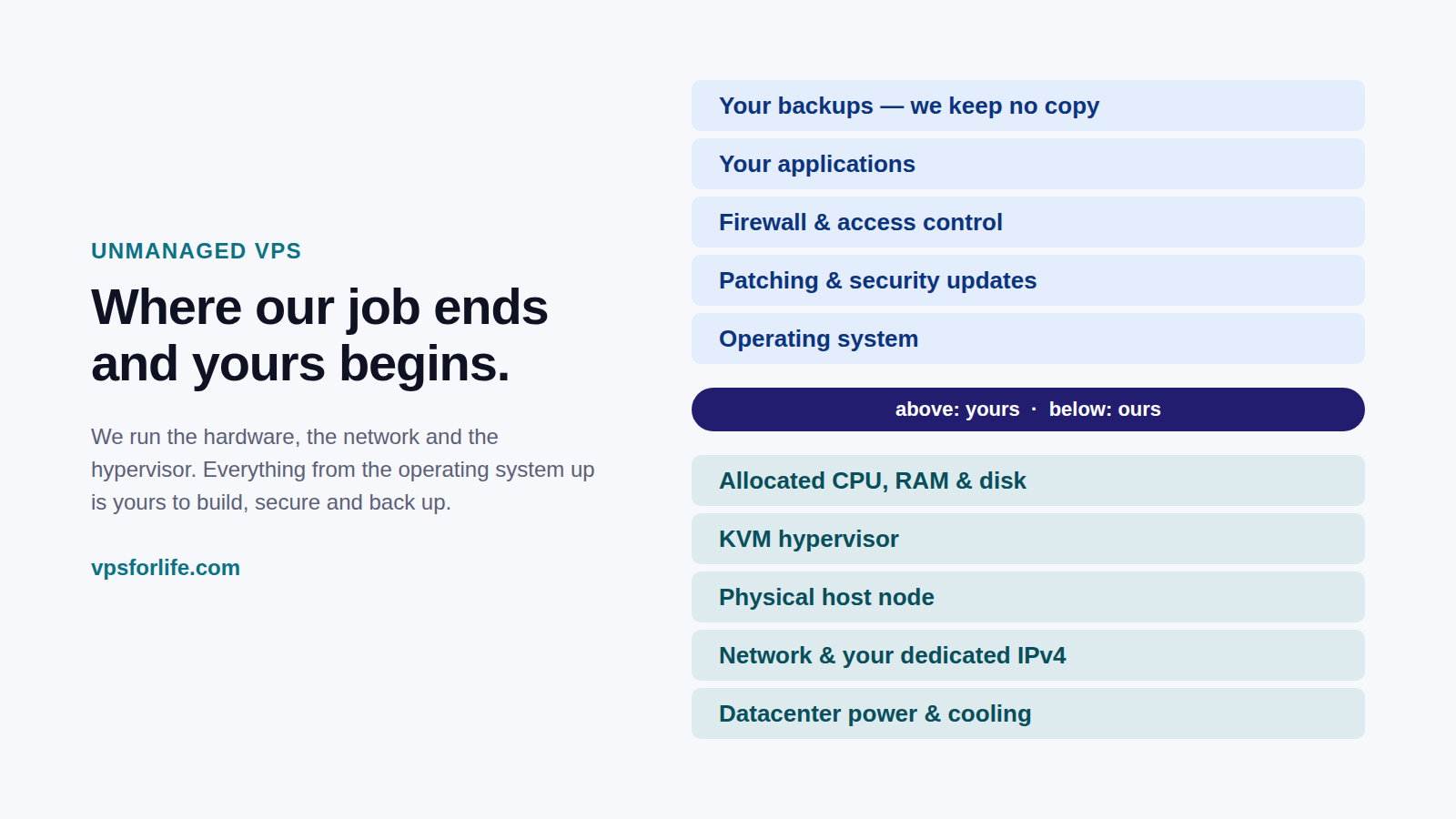
"Unmanaged" is a simple word covering a specific, well-defined split of responsibility. Here's exactly where the line sits on VPS For Life.

ResponsibilityVPS For LifeYou
Physical hardware, power, cooling
Network uptime & connectivity to your VPS
KVM virtualization layer & hypervisor patching
Network-level DDoS filtering
Initial OS deployment (clean template)
Operating system security patches, after deployment
Installing and configuring your application stack
Firewall rules and open ports
Application-level backups✔ (unless your plan includes daily backup)
Monitoring your own services for downtime
Deployment & configuration guidance✔ (via support)
Acceptable use / abuse complianceInvestigates reports — see Abuse Handling Process✔ Keeps sending/traffic compliant

Who Should Choose Unmanaged VPS

A few concrete profiles where unmanaged hosting is the obvious fit.

Developers & Agencies

Need a clean box to deploy custom stacks, staging environments, or client projects without a control panel in the way.

VPS for Developers →
Email Infrastructure Operators

Running MailWizz, Postal or PowerMTA needs Port 25, a dedicated IP and full control over the mail stack.

Email Marketing VPS →
Docker & Self-Hosted App Users

Containerized workloads and self-hosted tools need Docker access most managed panels restrict.

VPS for Docker →
cPanel/DirectAdmin Resellers

Want to install their own licensed control panel rather than being locked into the provider's choice.

VPS for cPanel →

If none of that sounds like you — if you'd rather not touch a terminal at all — our Managed VPS page is worth reading before you decide.

Getting Started: A Practical Checklist

The first hour on a new unmanaged VPS matters. Here's a sane order of operations.

Security Best Practices You'll Own

Since VPS For Life doesn't manage the OS layer for you, these are the practices that matter most on any unmanaged Linux or Windows VPS.

SSH Key Authentication

Disable password login once a key-based login works, drastically cutting brute-force risk.

Automatic Security Updates

Tools like unattended-upgrades (Debian/Ubuntu) or dnf-automatic (RHEL-based) keep critical patches current without manual babysitting.

Minimal Open Ports

Only expose what's actually needed; everything else stays closed at the firewall.

Non-Root Application Users

Run web apps and services under a dedicated non-root user, keeping root reserved for admin tasks.

Off-Server Backups

A backup stored only on the same VPS doesn't help if that VPS is compromised or lost — copy critical data off-server.

Basic Log Monitoring

Even a lightweight log review habit (auth logs, web server logs) catches issues before they escalate.

Our network layer adds its own protection on top of what you configure — see DDoS Protected VPS and Full Root Access VPS for how the responsibility splits at the network edge versus inside your own OS.

Unmanaged VPS Pricing

Every tier below is fully unmanaged, with full root access included as standard.

PlanCPURAMStorageNetwork PortBackupPrice
Basic1 core1 GB10 GB SSD100 Mbps$4.95/mo
Standard2 cores2 GB15 GB SSD500 Mbps✔ Daily$9.95/mo
Advanced4 cores4 GB20 GB SSD1 Gbps$19.95/mo
Pro8 cores8 GB25 GB NVMe10 Gbps✔ Daily$27.95/mo

Every plan includes: full root/administrator access, one dedicated IPv4 address, Port 25 access, network-level DDoS filtering, and your choice of Ubuntu, Debian, AlmaLinux, Rocky Linux or Windows Server. See the full hardware specifications for exact detail, or the Pricing page to order.

Frequently Asked Questions

What does unmanaged VPS mean?

Unmanaged means you have full root or administrator access and are responsible for ongoing configuration, security updates and backups on your server, rather than the provider handling that layer for you.

Is unmanaged VPS suitable for beginners?

It's more suitable for people comfortable with basic server administration; our support team can help with initial deployment questions, but ongoing administration is yours.

Do I need to maintain my own backups on an unmanaged VPS?

Yes, unless your specific plan explicitly includes daily backup (Standard and Pro do), you are responsible for maintaining your own backups.

Can I install any software I want?

Yes, full root access means you can install any software compatible with your chosen operating system, with no provider-side allowlist.

Is unmanaged VPS cheaper than managed hosting?

Generally yes, since the price does not include ongoing administration, monitoring or patching performed by the provider's staff.

Will support help me if I run into a configuration problem?

Yes, our team can help with deployment and configuration questions through email or WhatsApp, even on unmanaged plans — see Contact Us.

What happens if I misconfigure my server?

Since the plan is unmanaged, you're responsible for fixing configuration issues yourself; our support team can offer guidance but doesn't perform ongoing administration on your behalf.

Can I install a control panel like cPanel or DirectAdmin myself?

Yes, full root access lets you install any control panel you have a valid license for — see VPS for cPanel and VPS for DirectAdmin.

Does unmanaged mean less secure?

Not inherently — network-level protections like DDoS filtering are still handled by us. What's on you is OS-level hardening; following the security checklist above covers the essentials.

Can I switch from unmanaged to a different service level later?

Our current lineup is unmanaged across all plans; contact sales if your project has specific managed-service requirements to discuss.

Is Windows VPS also unmanaged?

Yes, the same unmanaged model applies on our Windows VPS plans — full administrator access via RDP, with ongoing administration in your hands.

What's the difference between unmanaged VPS and a VDS?

Largely naming — see our VPS vs VDS comparison; both typically run on the same KVM virtualization and can be either managed or unmanaged depending on the provider's offering.

Related VPS Solutions

Managed VPS

Read an honest comparison between managed and unmanaged hosting.

Learn More →

Full Root Access VPS

A closer look at exactly what root access includes on every plan.

Learn More →

Cheap VPS

See our lowest-cost unmanaged plan, starting at $4.95/month.

Learn More →

Enterprise VPS Hosting

Production-grade infrastructure for business-critical unmanaged workloads.

Learn More →

Our Infrastructure

See the KVM virtualization, storage and network behind every plan.

Learn More →

Terms of Service

Read the exact root access and customer responsibility terms.

Learn More →

Take Full Control With an Unmanaged VPS

Full root access on Linux or Windows, starting at $4.95/month.

View VPS Plans